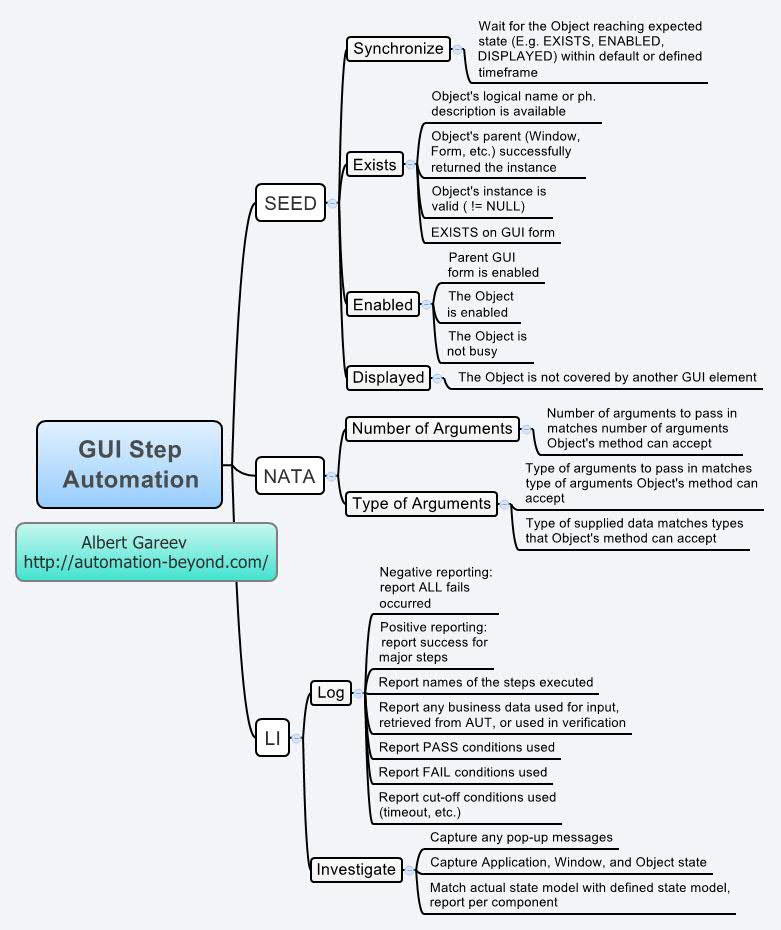
GUI Step Automation
SEED
Synchronize
Wait for the Object reaching expected state (E.g. EXISTS, ENABLED, DISPLAYED) within default or defined timeframe
Exists
Object's logical name or ph. description is available
Object's parent (Window, Form, etc.) successfully returned the instance
Object's instance is valid ( != NULL)
EXISTS on GUI form
Enabled
Parent GUI form is enabled
The Object is enabled
The Object is not busy
Displayed
The Object is not covered by another GUI element
NATA
Number of Arguments
Number of arguments to pass in matches number of arguments Object's method can accept
Type of Arguments
Type of arguments to pass in matches type of arguments Object's method can accept
Type of supplied data matches types that Object's method can accept
LI
Log
Negative reporting: report ALL fails occurred
Positive reporting: report success for major steps
Report names of the steps executed
Report any business data used for input, retrieved from AUT, or used in verification
Report PASS conditions used
Report FAIL conditions used
Report cut-off conditions used (timeout, etc.)
Investigate
Capture any pop-up messages
Capture Application, Window, and Object state
Match actual state model with defined state model, report per component
Albert Gareev http://automation-beyond.com/
GUI Step Automation
Added: 2010-05-28 18:00:17
From: (Joined 2009-12-18 18:57:42)
54 views |0 downloads
GUI Step Automation